About data selection gadgets
Data selection gadgets present users with selectable data. Other gadgets can link to data selection gadgets to filter their displayed data.For example, a selection gadget can be a list of customers. When a user selects a customer from the list, a linked report gadget can show data about to the selected customer.
Data selection gadgets can be linked to other data selection gadgets to present users with related data choices. For example, a list gadget displaying customer order numbers is linked to a list gadget displaying customer names. When the user selects a customer name, the order numbers for the selected customer appear in the list gadget of order numbers.
The following gadgets are available in the data selection category of gadgets:
Users can select day, month, or year from a BIRT data object using calendar gadgets. Fast access to a month or year is available by selecting the month and year, as shown in Figure 3-26.
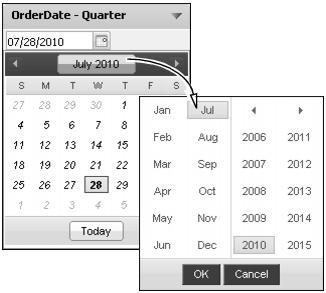
Figure 3-26 Report parameters in a calendar gadget
Check box gadgets display data with a check box next to each value, as shown in Figure 3-27. This gadget supports multiple-value selections. Users can also clear the selected value.

Figure 3-27 Report parameters in a check box gadget
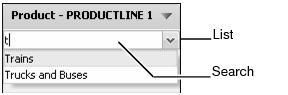
Combo box gadgets display data in a drop-down list, as shown in Figure 3-28. This gadget supports typing of values, using auto-suggest functionality, and selecting from a list of values.
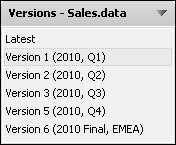
Users select the data object store version to display on the dashboard. Other gadgets on the dashboard that use the same data object store display the version selected by the user. Users can select the most current data object store by choosing Latest from the list of available versions. Figure 3-29 displays different versions of the data object store that a user can select.
Radio button gadgets display data with a radio button next to each value, as shown in Figure 3-30. This gadget supports single-value selections.
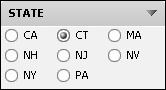
Figure 3-30 Report parameters in a radio gadget
List gadgets display data in rows, as shown in Figure 3-31. This gadget supports multiple-value selections and searching list items. Press the shift key while selecting separate values; press Ctrl while selecting a range of values. Users can also clear the selected value.
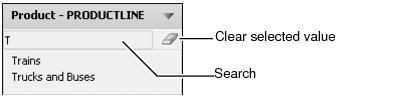
Figure 3-31 Report parameters in a list gadget
Slider gadgets display data as a sliding bar with tick marks next to known values. Figure 3-32 shows a slider gadget.
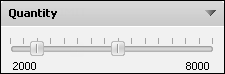
Figure 3-32 Report parameters in a slider gadget
