Printing a document
Use Schedule—Print to control how iServer prints the output document after generating it. If you want to print the document, either by sending it to an iServer printer or printing it to a file on the server, you must first select Print the output document on the server. This setting enables the other options on Print. In Override default settings, accept the default values, or choose to override the default settings for any of the print options.
Figure 5-29 shows Schedule—Print as it appears when choosing to print a BIRT document. The print format: Postscript section contains a number of options, including Page Range, Page Style, and Chart DPI. When choosing to print Actuate Report Executable (.rox) output, an option with which to select a page range appears in place of Print format: Postscript, as shown in Figure 5-30.
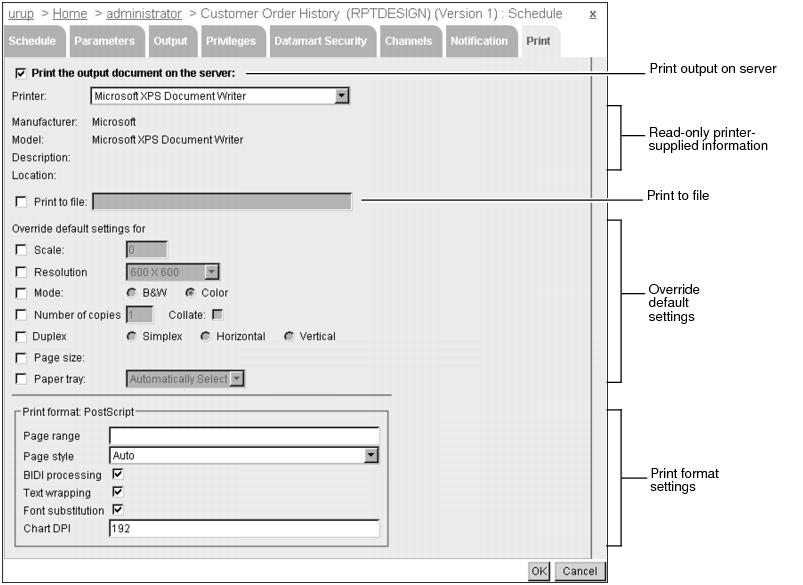
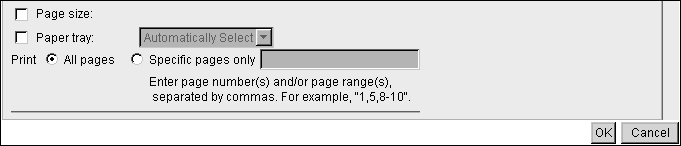
Table 5-7 lists the various print options on Schedule—Print.
