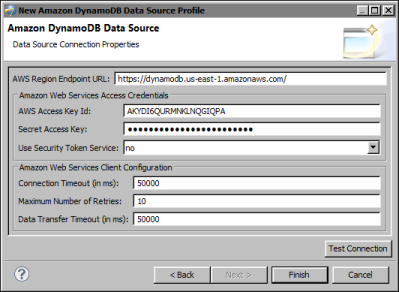
Actuate BIRT Designer provides an ODA (Open Data Access) driver to connect to Amazon DynamoDB. You provide the regional endpoint to a web service to access an Amazon DynamoDB database, as well as, your access credentials.
|
3
|
In New Amazon DynamoDB Data Source Profile, specify the properties to connect to your Amazon DynamoDB database instance.
|
|
1
|
In AWS Region Endpoint URL, specify the regional endpoint to the web service to which to make requests. The default value specifies the US-East region, which the AWS SDKs and console for Amazon DynamoDB reference. For a list of supported regions and endpoints, see the Amazon DynamoDB documentation.
|
|
2
|
In Amazon Web Services Access credentials, type your user credentials to log in to the system. Set Use Security Token Service to yes to use temporary security credentials.
|

|
In Connection Timeout, specify the number of milliseconds to wait for a connection.
|
|
|
In Maximum Number of Retries, specify the number of times to attempt to connect until a successful connection is established.
|
|
|
In Data Transfer Timeout, specify the number of milliseconds to wait for a response to a data request.
|
Figure 8-1 shows an example of properties to connect to a database instance in Amazon DynamoDB.