Using a text element
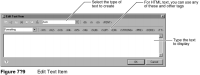
You can place a text element directly on the page or in any of the container elements. When you insert a text element, the layout editor displays the text editor, as shown in Figure 7‑9.
First, decide what type of text you want to create. You have three choices:

Auto
Plain text
HTML
HTML enables you to create highly formatted text using HTML tags or CSS properties. The text can contain placeholders for data set field values and expressions, which enable you to mix static text with dynamically generated values. Plain text and auto, on the other hand, cannot contain internal formatting or dynamic values. A text element that is set to plain text or auto functions like a label element.
After selecting the text type, type the text to display in the report. If you selected HTML, you can use HTML tags or CSS properties in the text. Type the tags manually, or insert the commonly used HTML tags that the text editor provides.
The following sections provide a few examples of text you can create using a text element of HTML type.