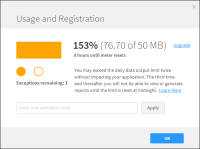
What constitutes an exception? What happens if I hit an exception?
An exception is when you exceed your daily data limit. Throughout the whole time that you have BIRT F-Type running, you can go over the daily data quota twice without impacting your application. The third time and thereafter, the system will only allow you to do administrative tasks such as changing scheduled jobs, adding or deleting users. You will not be able to view or generate reports until the limit is reset at midnight (local time zone).
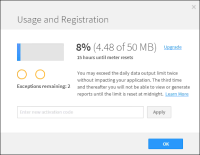
Information about exceptions can be found on the top right of both the tutorial and in BIRT F-Type in the click-able meter that displays the daily data usage.
What happens when I have used up my two exceptions and the system is in lockout mode?
Once you have exceeded your daily output more than twice, BIRT F-Type will go into lockout mode until midnight of the same day. At midnight (local time zone) the daily output limit will again start at 0. If you need more capacity, follow the Upgrade link in the dialog.
How can I increase my data capacity? What happens when I upgrade BIRT F-Type?
For increasing your daily data output limit, please follow the Upgrade link in the dialog to purchase additional capacity and apply for a new Activation Code:
1 Open the data usage dialog.
2 Enter the new code in the text box.
3 Click “Apply”.
The iHub service will restart automatically. After the iHub services restarts, the Account Login screen will be shown.
 Running a report