BIRT F-Type is distributed to you subject to this license.
Some of the more uncommon restrictions in this license are:
The computer on which you install BIRT F-Type may not be connected to any other computer, through a clustered configuration or otherwise, so that multiple computers or multiple copies of the software act as one system or application.
For a single application, you may not combine installations or copies of BIRT F-Type or any other software licensed on a commercial basis from Actuate or a third‑party licensor.
You may not use BIRT F-Type for development, test, back-up, or other non‑production use in an application where you use commercially licensed Actuate software for production (and vice versa).
Please refer to the license for all of the terms governing your use of BIRT F-Type.
How can I upgrade BIRT F-Type? What are my options?
There are two ways to upgrade BIRT F-Type.
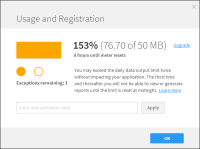
1 Increase your daily data out capacity of BIRT iHub F-Type, by following the Upgrade link in the dialog to purchase additional capacity and apply for a new Activation Code:
1 Open the data usage dialog.
2 Enter the new code in the text box.
3 Click “Apply”.
The iHub service will restart automatically and the Account Login screen will be shown. The usage meter will change to show the additional capacity you have purchased.
2 Upgrade to a full BIRT iHub license by taking the following steps:
2 Complete the transaction and agree to a new set of terms to receive a new license file.
3 Stop the iHub service.
4 Replace the license file (and follow instructions provided with the new license file).
5 Restart the service.
When you’ve done that, the usage meter will disappear. You will have to separately download and install System Console, since this component is not included in BIRT F-Type. The URL will be provided in an email after you agree to the new set of terms.
What happens when I upgrade to another BIRT iHub license type? Will I lose my work?
 The computer on which you install BIRT F-Type may not be connected to any other computer, through a clustered configuration or otherwise, so that multiple computers or multiple copies of the software act as one system or application.