How to change the grouping order
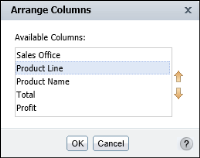
1 Select a column. From the context menu, choose Column
➛Reorder Columns. Arrange Columns, as shown in
Figure 5‑12, shows the columns in the order in which the report currently displays the data.
Figure 5‑12 Reordering grouped columns
2 On Arrange Columns, select the grouped column from Available Columns. Use the up or down arrow buttons to move the column up or down the list. Choose OK.