Designing data sets for a cube
This design phase requires more thought and planning. The data set must accomplish two key things. It must retrieve data from the source in a resource-efficient manner and also in a way that makes sense for the cube. How you write the SQL query to get the data depends on how the database is structured. When planning how to get data for a cube, you also have to decide whether to build one data set or multiple data sets.
BIRT supports the creation of cubes using data from a single data set or multiple data sets to support the different ways data sources can be structured, and report developers’ different levels of expertise. In other words, the decision to build one or multiple data sets to get data for a cube depends on how the data source is structured, and also on your grasp of OLAP design principles.
The cube builder in BIRT is designed for report developers with varying OLAP expertise. You do not have to know much about OLAP to build a data set or a cube for a cross tab, but if you have the expertise, you can design data sets that apply OLAP design principles for optimal performance.
It is beyond the scope of this book to teach OLAP principles, but an introduction to the subject might help you decide whether it is worth exploring OLAP further.
Comparing OLTP and OLAP
Online Transaction Processing (OLTP) systems and Online Analytical Processing (OLAP) systems are two common database structures. Each serves a different purpose.
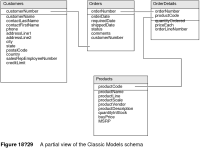
OLTP is the standard, normalized database structure designed for transactions, where data inserts, updates, and deletes must be fast. One of the ways OLTP systems optimize the entry or updates of records is by minimizing repeated data. For example, complete information about an order includes an order number, a customer name, a bill-to address, a ship-to address, and a payment method. The order details include a product number, a product description, the quantity ordered, and the unit price. In a flat structure, each order detail record would need all that information. That is a lot of repeated information, which is why OLTP systems use relational technology to link the information. The Classic Models sample database is an example of an OLTP database. Figure 18‑29 shows a partial view of the Classic Models schema. Tables are linked to one another by keys.
By contrast, OLAP is a database structure designed for performing analysis to reveal trends and patterns among data. This structure more closely represents the way people ask questions or want to view data. For example:

What are the sales amounts for each product this month?
Are product sales up or down compared to previous months?
What products saw the greatest increase this quarter?
In what regions did product sales increase this quarter?
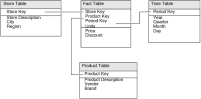
Figure 18‑30 shows an example of an OLAP structure.
Figure 18‑30 An OLAP schema
This particular OLAP structure is commonly referred to as a star schema because the schema diagram is shaped like a star, that is, one in which points radiate from a central table. The central table is called a fact table, and the supporting tables linked to it are dimension tables. As
Figure 18‑30 shows, the fact table contains the measures and keys to link to each dimension table. The dimension tables do not link to one another.
Many-to-one relationships exist between the keys in the fact table and the keys they reference in the dimension tables. For example, the Product table defines the products. Each row in the Product table represents a distinct product and has a unique product identifier. Each product identifier can occur multiple times in the Sales fact table, representing sales of that product during each period and in each store.
Designing a single data set
Design a single data set if:
You are retrieving data from a database that uses an OLTP structure.
You are well-versed in writing SQL joins. Because an OLTP structure minimizes repeated data, you typically have to join many tables to get all the data you need. The query you created in the tutorial joined four tables to get data for a cube that contained only two dimensions and one measure.
You find it too complicated to create data sets from a OLTP structure to resemble a star schema. This exercise can feel like fitting a square peg into a round hole.
The disadvantage of creating a single data set is that, typically, it must use multiple joins. These joins are complex to create and increasing the number of joins can slow queries.
Designing multiple data sets in a star schema
Create multiple data sets to retrieve data for a cube if:
You are retrieving data from a database that uses an OLAP star schema.
You are familiar with star schemas.
The number of joins required to get the data from multiple tables is too complex and degrades performance.
If the database uses a star schema, you can create data sets that mimic the structure, one data set for each fact table and dimension table in the star schema.
If the database uses an OLTP structure, you can also create one data set to retrieve the data to calculate the measures, and one data set for each dimension. Because you are trying to map data from an OLTP structure to data in a OLAP star schema, the mapping process is less intuitive, and you might also find that you still need to create multiple joins in each data set.