How to insert multiple dimensions in the row or column area
1 Drag a dimension from the cube and drop it in the row or column area of the cross tab.
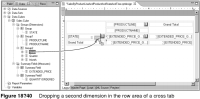
2 Drop the second dimension either on the left or right side of the first dimension, depending on the order in which you want to display the data. Figure 18‑40 shows placing the second dimension on the right side of the first dimension, as indicated by the position of the line cursor.