Displaying multiple measures
A cross tab can display any number of measures. For example, a cross tab that displays aggregate data by product line and state can show the sales total in dollars, the number of units sold, the number of customers, and so on.
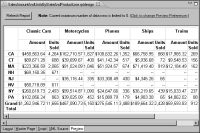
Figure 18‑44 shows a cross tab that displays two measures, sales total amounts and total units sold.
Figure 18‑44 Cross tab displays two measures side by side
When you insert multiple measures, by default, the cross tab displays the measures horizontally as shown in
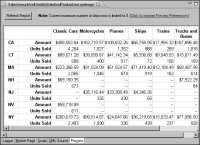
Figure 18‑44. You can specify that the cross tab display them vertically instead, as shown in
Figure 18‑45.
Figure 18‑45 Cross tab displaying two measures, one above the other
A comparison of the cross tabs in
Figure 18‑44 and
Figure 18‑45 shows that displaying measures vertically reduces the width of the cross tab and increases its height. So, besides your preference for reading the values horizontally or vertically, use this layout option to adjust the height and width of a cross tab.