How to insert multiple measures in a cross tab
1 Drag a measure from the cube and drop it in the detail area of the cross tab.
2 Similarly, insert the second measure next to the first measure.

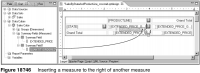
To display the second measure to the right of the first measure, drop the measure when the line cursor appears to the right of the data element for the first measure, as shown in Figure 18‑46.
To display the second measure to the left of the first measure, drop the measure when the line cursor appears to the left of the data element for the first measure.