How to display totals as charts
1 Click the button next to any data element that displays dimension values.
2 Choose Totals. Totals shows the subtotals and grand totals that the cross tab displays in the row area and the column area.
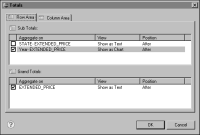
3 Select the subtotal or grand total that you want to display as a chart. Under View, click Show as Text, then select Show as Chart.
Figure 18‑60 shows the year subtotal with its View option set to Show as Chart.
Figure 18‑60 Year subtotal View option set to Show as Chart
4 Choose OK.