Sorting cross tab data
By default, a cross tab displays data sorted by dimension values. In other words, values displayed in the row and column headings are sorted in ascending order. If you wish, you can sort the dimension values in descending order.
A more common reporting requirement is to sort data by totals. Compare the cross tabs in
Figure 18‑68 and
Figure 18‑69. The cross tab in
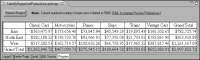
Figure 18‑68 displays row and column heading values in the default ascending order. In the rows, the values are East–West. In the columns, the values are Classic Cars–Vintage Cars.
Figure 18‑68 Data sorted by default
The cross tab in
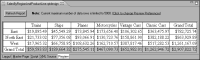
Figure 18‑69 displays data sorted by product grand totals, in ascending order. The product line names in the column heading are not in alphabetical order. The product grand totals in both cross tabs are highlighted for easier comparison.
Figure 18‑69 Data sorted by product line grand totals in ascending order