About custom emitters
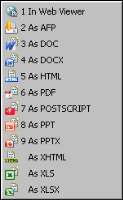
In Actuate BIRT Designer Professional or Interactive Viewer you can choose to render BIRT reports in several different formats, as shown in
Figure 6‑1.
Figure 6‑1 Rendering formats
Actuate provides report rendering for the following file formats:

AFP - Advanced Function Printing document format
DOC - Microsoft Word document
DOCX - Microsoft Word document, introduced in Windows 7
HTML - HyperText Markup Language document, a standard format used for creating and publishing documents on the World Wide Web
PDF - Created by Adobe, a portable file format intended to facilitate document exchange
POSTSCRIPT - A page description language document for medium‑ to high‑resolution printing devices
PPT - Microsoft PowerPoint document
PPTX - Microsoft PowerPoint document for Windows 7
XHTML - Extensible HyperText Markup Language document, the next generation of HTML, compliant with XML standards
XLS/XLSX - MS-Excel document
If you need to export your document to a format not supported by Actuate, for example CSV or XML, you must develop a custom emitter. Actuate supports using custom emitters to export reports to custom formats. After a system administrator places custom emitters in the designated folder in iHub, users are able to use them as output formats when scheduling BIRT report jobs or exporting BIRT reports. Custom emitters are also supported as e-mail attachment formats.
The iHub uses the custom emitter format type as a file extension for the output file when doing the conversion. When you develop custom emitters always use the same name for a format type and an output file extension type. Management Console and Actuate Information Console display the options of each emitter for the user to choose when exporting a report.
Integrating and Extending BIRT, published by Addison-Wesley, provides detailed information about how to develop custom emitters in BIRT.