How to export a BIRT report in Management Console
1 Open Management Console.
2 Navigate to the Public/BIRT and BIRT Studio Examples folder.
3 Click the blue arrow next to CustomerList.rptdesign and select the Schedule option from the menu.
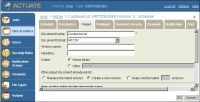
4 On the Schedule page select the Output tab.
The new MYCSV format appears in the list of the available formats, as shown in
Figure 6‑4.
Figure 6‑4 Output format in Management Console
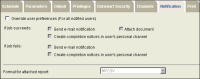
5 Choose the Notification tab in the Schedule Job page. Select MYCSV format from the Format for the attached report’s drop-down list, as shown in
Figure 6‑5.
Figure 6‑5 Notification tab in the Schedule Job page
6 Choose OK. The generated report is saved as CustomerList.MYCSV in the Encyclopedia volume. The report is also attached to the e-mail notification.