Configuring the BIRT design cache
By default, iHub caches a BIRT design, including access privileges. Caching benefits users who access the design concurrently. Users who request access to the same design share the cached design if they have the required privileges. Performance can improve because iHub does not have to repeatedly load the design. Generally, the fewer number of designs iHub needs to load, the better the response time.
By configuring the cache timeout, the administrator can control how long the design remains in the cache. iHub removes the design from the cache when the time elapses. Increasing the timeout increases the time the design stays in the cache. Decreasing the timeout purges the design sooner.
The administrator can also configure a limit on the number of designs in the cache. When the cache reaches the limit, caching stops. To disable caching, set this limit to zero.
How to configure the BIRT design cache
1 In Configuration Console, on Server Configuration Templates, expand Viewing Service, BIRT, and BIRT Content Caches and choose Design Cache.
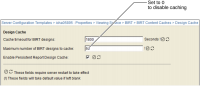
2 In Cache timeout for BIRT designs, accept the default, 1800 seconds or 30 minutes, as shown in
Figure 2‑7. Alternatively, type another value.
Figure 2‑7 Configuring the BIRT design cache
3 In Maximum number of BIRT designs to cache, accept the default, 50, or type another value that limits the number of designs in the cache. To disable caching, set to 0. Choose OK.
4 Restart iHub.