How to publish a resource from the Resource folder to iHub
1 In Actuate BIRT Designer, choose File➛Publish➛Publish to iHub.
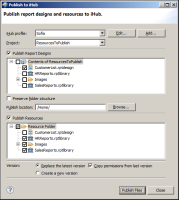
2 Select the iHub profile, as shown in
Figure 2‑5.
3 On Publish to iHub, you can publish reports and resources. Choose Publish Resources.
4 On Publish to iHub, expand the Actuate BIRT Designer’s Resource Folder and select the resources to publish.
Figure 2‑5 Publish to iHub
5 Choose Publish Files. A new window showing the file upload status appears.
6 Choose OK when the upload finishes.
7 In Publish to iHub, choose Close.