Understanding the help directory structure
The local Information Console help files are grouped into directories under the context root for Information Console, which is the home directory in which the Actuate product resides. For example, the default context root for Information Console installed as a component of iHub on Windows systems is <Actuate home>\iHub2\servletcontainer\iportal and on Linux systems is <Actuate home>/iHub2/servletcontainer/iportal. The localized help directory under the context root is the container for the help implementation:
<context root>\help
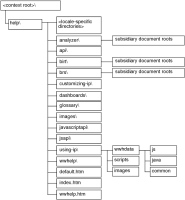
Figure 10‑2 illustrates the Information Console help directory structure.
Figure 10‑2 Information Console help directory structure
Actuate uses JavaScript (.js) and HTML (.html) files to implement Information Console help. The files that support top-level help styles and images reside in the wwhelp directory. Files that support help content pages and help navigation reside in a document root directory. A document root contains the help files for a specific top-level help topic, such as dashboards or glossary.