Capturing SOAP messages using Axis TCPMonitor
The Actuate Information Delivery API uses SOAP messaging in a request and response pattern for communications between the client and BIRT iHub System. The Actuate Information Delivery API packages an XML request in a SOAP envelope and sends it to BIRT iHub System through an HTTP connection.
You can use Axis TCPMonitor (tcpmon) utility to monitor the SOAP messages between an application and the Encyclopedia volume. You configure TCPMonitor to listen at a port for an incoming message to the Encyclopedia volume. You redirect the client application to send a request message to the port where TCPMonitor listens.
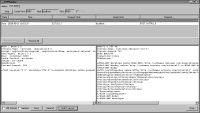
TCPMonitor intercepts the message, displays the SOAP message in the request panel, then redirects the message to the Encyclopedia volume. When the Encyclopedia volume responds, TCPMonitor intercepts the message, displays the SOAP message in the response panel, then redirects the message to the client application.
TCPMonitor logs each request-response message pair. You can view a message pair by choosing an entry row in the top panel. You can also remove an entry, edit and resend a message, and save a message pair to a file.
The TCPMonitor utility is in the org.apache.axis.utils package in \lib\axis.jar. You can run TCPMonitor from the command line using the following syntax:
java org.apache.axis.utils.tcpmon [listenPort targetHost targetPort]
The following command line statement starts the TCPMonitor graphical user interface:
java org.apache.axis.utils.tcpmon
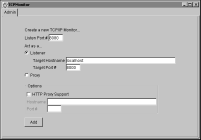
In TCPMonitor—Admin, configure the listener port for TCPMonitor, enter the target hostname for BIRT iHub, then enter the target port.
In
Figure 6‑1, TCPMonitor—Admin sets tcpmon to listen at port 8080, sets the target hostname for BIRT iHub to localhost, and sets the target port to 8000.
Figure 6‑1 The TCP Monitor—Admin page
You can also configure TCPMonitor directly from the command line, as shown in the following example:
java org.apache.axis.utils.tcpmon 8080 localhost 8000
You can redirect a client application to send a request message to the port where TCPMonitor listens using a command line argument as shown in the following example:
java AcLogin -h http://localhost:8080
Figure 6‑2 shows a request-response message pair from a login operation captured in TCPMonitor.
Figure 6‑2 Example of a request-response message pair in TCP Monitor