How to configure a custom event web service
iHub Configuration Console provides a system administration interface for setting up the custom event web service. To set up a custom event web service, perform the following tasks:
1 Log in to the iHub Configuration Console, choose Advanced View, then choose System Volumes.
2 On Volumes—Properties, choose Events.
3 On Events, perform the following tasks:
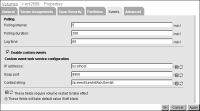
1 On Polling, specify the following parameters:
1 Polling interval
The amount of time between each polling interval. The default value is 5 minutes.
2 Polling duration
The amount of time that BIRT iHub continues polling the web service. BIRT iHub polls for the event status until the event occurs or the event expires. The default value is 300 minutes.
3 Lag time
The amount of time that an event occurrence is valid to satisfy an event requirement. For example, if BIRT iHub checks the status of an event with the lag time set to 10 minutes, and the event occurs in that 10‑minute interval, the event satisfies the job requirement. If the event occurs after the 10‑minute interval elapses, the occurrence does not satisfy the job requirement. The default value is 60 minutes.
These values apply to all event types. A user can modify these default values in each SubmitJob or UpdateJobSchedule request by resetting the values in the accompanying Event object.
2 Select Enable custom events.
3 On Custom event web service configuration, specify the following parameters:
1 In IP address, type the machine name or IP address of the application server running the custom event service.
The default name on a Windows machine is localhost.
2 In SOAP port, type the application server SOAP port used by the custom event service.
The default port is 8900.
3 In Context string, type the application server context path used by the custom event service.
If the event service is in $AC_SERVER_HOME/servletcontainer/webapps/myEvent, the context is /myEvent/servlet/AxisServlet. The default context string is /acevent/servlet/AxisServlet.
If these parameters are not set, BIRT iHub uses the default values to connect to the sample event service.
Figure 6‑5 shows the default settings for a custom event configuration on a Windows machine.
Figure 6‑5 Default settings for a custom event configuration
on a Windows system
To change the event service configuration, configure these settings in the acserverconfig.xml file:
<Volumes>
<Volume>
…
EventPollingInterval="10"
EventPollingDuration="300"
EventLagTime=”60”
CustomEventServiceIPAddress=”hostname or IP address”
CustomEventServicePort=” 8900 or other port number”
CustomEventServiceContextString=
“/myEvent/servlet/AxisServlet”>
…
</Volume>
<Volumes>
Starting with Release 11 and iHub, the default location for acserverconfig.xml is AC_DATA_HOME/server/config. AC_DATA_HOME refers to the folder the installer specifies as the location for data during the iHub installation. By default, that path is C:/Actuate/iHub/data on a Windows system, and /<Installation directory>/AcServer/data on a Linux system.