How to configure the volume archive service provider
1 Log in to the iHub Configuration Console and choose Advanced view.
2 From the side menu, choose Volumes.
3 On Volumes, select the icon to the left of the Encyclopedia volume. Choose Properties.
4 On Volume—Properties, perform the following tasks:
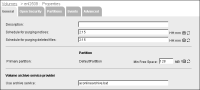
5 In Volume archive service provider, select Use command line. Type:
aconlinearchive.bat
Figure 13‑1 Configuring the volume archive service provider
Choose OK.
6 Log out of iHub Configuration Console.