Getting a table of contents
Use GetTOC to get the table of contents for a report. You must indicate the level from which you want to start viewing and the depth to which you want to view. In
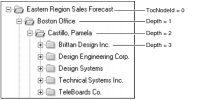
Figure 4‑1, TocNodeId for Eastern Region Sales Forecast is 0, the top level of the table of contents. Depth indicates how many additional levels you want to retrieve. As shown in
Figure 4‑1, if you set a depth of 2, the response contains the top level, the first level, showing the offices in the eastern region, and the second level, showing data about sales representatives in each office.
To see the sales representatives’ accounts, request a depth of 3.
Figure 4‑1 Getting a table of contents
The following example requests the table of contents for Forecast.rptdocument:
<SOAP-ENV:Body>
<GetTOC>
<Object>
<Name>/Temp/Forecast.rptdocument</Name>
</Object>
<ViewParameter>
<Format>XMLDisplay</Format>
</ViewParameter>
<TocNodeId>0</TocNodeId>
<Depth>2</Depth>
</GetTOC>
</SOAP-ENV:Body>
In this example:

Object identifies the path to the report.
ViewParameter indicates the display format, such as XMLDisplay.
TocNodeId indicates the level from which you want to start viewing.
Depth indicates the number of levels to retrieve.
This request returns the table of contents as an attachment:
<SOAP-ENV:Body>
<GetTOCResponse>
<TocRef>
<ContentId>Attachment</ContentId>
<ContentType>text/xml</ContentType>
<ContentEncoding>binary</ContentEncoding>
<Locale>default</Locale>
</TocRef>
</GetTOCResponse>
</SOAP-ENV:Body>