How to display empty rows and columns
1 Select the cross tab.
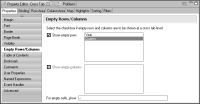
2 In Property Editor, under Properties, choose Empty Rows/Columns.
The Empty Rows/Columns page shows the dimensions for which empty rows and columns can be added.
3 Select Show empty rows or Show empty columns, or both.
4 In the last field, type the string to display in the empty cells.
Figure 18‑62 Selecting Show empty rows
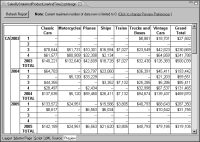
5 Preview the report.
Figure 18‑63 shows an example of empty rows added for quarters that do not contain sales data.
Figure 18‑63 Cross tab displaying rows for quarters in which no sales data exists