How to specify user-defined values for row and column headings
1 In Data Explorer, expand Data Cubes, and double-click the cube.
2 In the Cross Tab Cube Builder, choose Groups and Summaries.
3 Select the dimension to edit, then choose Edit.
4 In Group Level, select Static. This option indicates that this dimension displays static values that you define.
5 Create a member-expression entry for each value to display.

In Member, type the value to display in the cross tab.
In Condition Expression, type the expression that indicates the value to replace.
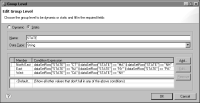
Figure 18‑67 shows examples of member-expression entries to display the following values:
North East in place of CT, MA, and NH
East in place of NJ, NY, and PA
West in place of CA and NV
Figure 18‑67 Group Level showing user-defined dimension values
Choose OK to save the changes.
6 Choose OK to close the cross tab builder.